M-Audio Trigger Finger Pro Test And Review (Video)
Content
Trigger Finger Pro: An introduction
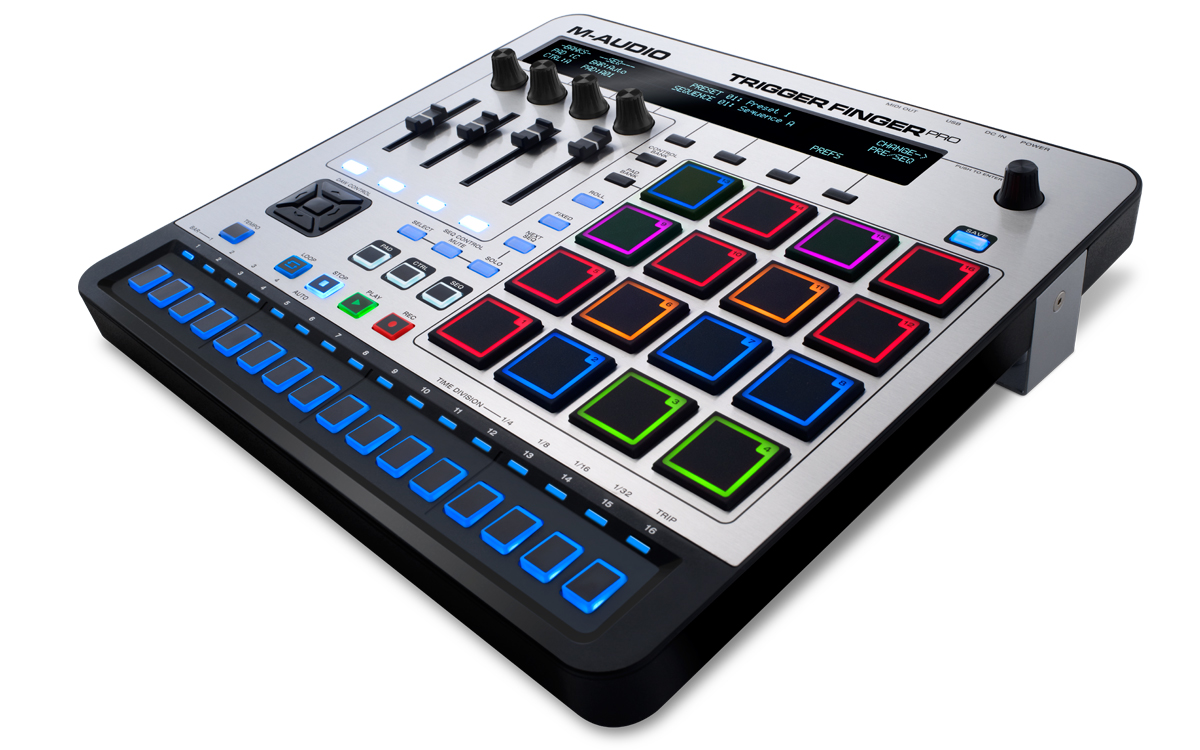
What Exactly Is The Trigger Finger Pro?
Its Use For Finger Drumming: The Pad Section
The Trigger Finger Pro Software Editor: Ehm… Which Editor?
Trigger Finger Pro: An introduction
Testing M-Audio’s “Trigger Finger Pro” is special for me. Why? Because its predecessor, the “Trigger Finger,” is what “triggered” my decision to develop a finger drumming tutorial about six years ago. Much of the XpressPads finger drumming course has been thought out, developed, and tested with the legacy Trigger Finger. This means that I spent a lot of time with the Trigger Finger Pro’s predecessor.
Back then, pad controllers were built for general purposes, not bound to ONE software application, just compatible with any kind of music production software. Opposed to “pad controllers,” “drum machines” were built with onboard sounds and with manifold sound-manipulation features. Pad controllers cost between US $100 and US $250, while drum machines ran anywhere from US $500 to US $2,500. There was a clear distinction between both product families.
Fast forward six years and we all know that the world of pad controllers and drum machines has changed considerably. While there are still a few “traditional” pad controllers and drum machines available, there is a clear tendency towards “integrated systems.” Those are most often called groove production studios and are hybrids, which means that the hardware is sold with a dedicated music software application, and these two components (hardware and software) function as one coherent system. Instead of using these just for finger drumming and beat making, this new generation of groove production studios can be used to produce complete songs. They cost between US $300 and US $1,000, depending on features and functionalities. I can cite just a few names here: Native Instruments Maschine, AKAI MPC, Ableton Push, Novation Lauchpad Pro.
Why do I mention this? Because I believe that M-Audio has tried to step into this changing market with the Trigger Finger Pro; a bit late, and perhaps a bit half-hearted, definitely without a clear USP. A couple of things make the Trigger Finger Pro different from these other groove production studios.
What exactly is the Trigger Finger Pro?
First of all, I don’t see a fully-fledged “integrated” software solution that comes with the Trigger Finger Pro, which would make it a serious groove production studio. While Machine, MPC, Push, and the Launchpad Pro are well integrated into sophisticated music-production and -performance applications that let one create songs from the first sketches to the final mix, I don’t see this capability in the Trigger Finger Pro or the software that accompanies it. “Arsenal,” a kind of sound container software that is neither a real host nor a sequencer, is the application that the Trigger Finger Pro is integrated into.
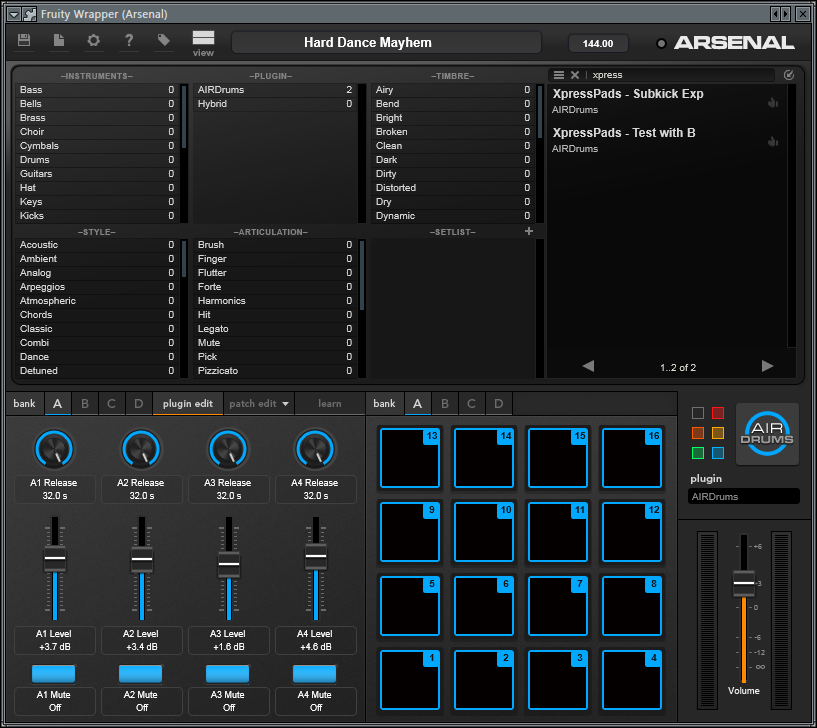
To me, this integration is a rather “flat” one. Compared to the applications that its above-mentioned big brothers are shipped with or made for, Arsenal has a limited feature set. What I am missing is a way to create full songs with it and properly mix them down, not to mention the ability to apply automation in an efficient or simple way. Also, the sequencing functionality of the Trigger Finger Pro is not linked to the Arsenal software. The sequencer sits in the hardware and can’t be edited software-wise. This approach feels a bit like going back in time to the 90’s. So I ask myself: What is Arsenal needed for? For live performances? For jamming? Just for fun? Honestly, I tried, but I don’t understand the concept.
Its Use For Finger Drumming: The Pad Section
Let’s go back to basics and discuss how suitable the Trigger Finger Pro is for finger drumming. The pad section is the most important aspect of any pad controller or groove production studio, so it deserves a closer look. Another important aspect is the placement of knobs and faders right on the device because this determines how playable the pads are with specific finger drumming hand postures.
First things first: the pads! The pads of the Trigger Finger Pro are standard-sized and back-lit. The on- and off-color can be edited. The pad sensitivity can be tweaked via on-board editing. There are three options available for pad sensitivity editing: “sensitivity,” “gain,” and “curve.” While the sensitivity parameter sets the threshold at which hit velocity a pad is triggered, the gain parameter determines the amplification of a triggered hit. The curve parameter lets you choose one of five different input velocity conversion curves: two exponential, two logarithmic, and one linear curve. The curve parameter is particularly helpful when the Trigger Finger Pro is used for different kinds of finger drumming. This way, a logarithmic curve could be used when playing dance or metal music, which clearly needs high-energy drum hits. An exponential curve could be used when playing gentle jazz or other calm music that requires softly played drum sounds. After some tweaking, I was able to create a pad sensitivity setting that was just right for my hands.
As mentioned, the placement of knobs and faders on the surface of the device is important for finger drumming. First of all, these control elements should not stick out too much above the surface, and secondly, they should not be placed too close to the pad section. Otherwise, they would be in the way when playing the pads with certain hand postures. The placement of both the knobs and the faders on the Trigger Finger Pro is good and will not interfere during finger drumming performances.
The Trigger Finger Pro Software Editor: Ehm… which editor?
The legacy Trigger Finger included a software editor called “Enigma.” Although I loved the legacy Trigger Finger, I didn’t at all like Enigma because I found it cumbersome to edit, and it sometimes was a matter of luck whether or not presets were stored on the hardware. The Trigger Finger Pro is much more complex than its predecessor with all its options to control different software parameters and with all its different banks and the sequencer. That makes me believe that it is shipped with an editor to help me get quickly organized and to exchange presets with friends and colleagues. I was impressed by the fact that M-Audio didn’t develop an editor for the Trigger Finger Pro and expect users to change EVERYTHING manually. Even more worrying… when I googled to find out how to do a factory reset on the Trigger Finger Pro, I found a post on the M-Audio forum that made very clear that there is no such magic as a factory reset. That impressed me even more than the lack of an editor. In a nutshell, this means that if you spoil a factory preset that the Trigger Finger Pro comes with by default, good luck trying to re-build it on your own.
“AIR Drums” is great for EDM
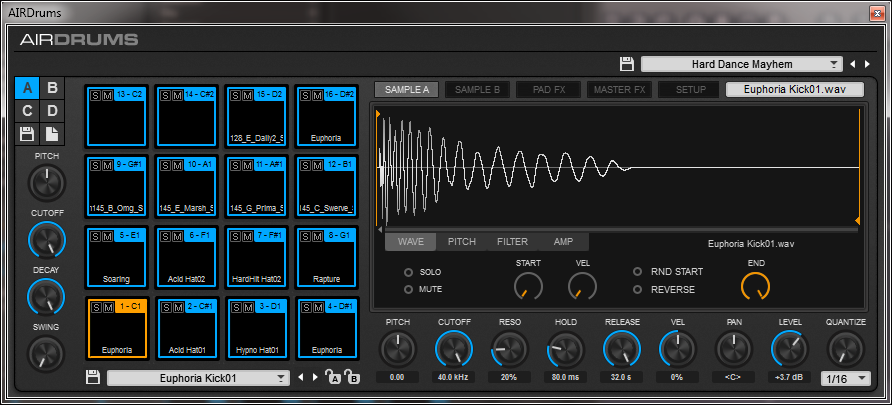
A highlight of the Trigger Finger Pro is “AIR Drums,” a simple yet effective (drum) sample player. I like it mainly for its huge and useful sample content. AIR Drums comes with a huge number of drum- and sound effect-presets that are geared towards different EDM genres. Probably because of its simple layout, it immediately provides all the bread and butter tools to effectively shape sounds. It is easy to use.
Conclusion
When the Trigger Finger Pro was launched early in 2014, its price was above US $350. Half a year later, the price dropped to US $250. At the time of this article, it costs about US $200. Is this the final price tag? I am not sure. The competition is tough in all three areas that the Trigger Finger Pro touches: the “pad controllers,” the “drum machines,” and the “groove production studios.” I think that it is a tough time for a product that doesn’t seem to know what it should be called—“Pad Controller Plus” or “Groove Production Studio Minus”?
Openly and honestly, I have no use for the sequencer in the Trigger Finger Pro. That’s not how I produce music in 2015. And that’s the reason I have no use for Arsenal. When I subtract these two features, I have no other choice than to see the Trigger Finger Pro as a traditional pad controller. That’s the only use I have for it, but for that purpose, it’s quite good!
I think the Trigger Finger Pro was launched late—too late if you’d ask me, at a time when the market was already occupied by two big players, Maschine and MPC. Moreover, I ask myself if M-Audio really ever tried hard enough to enter this market, because a modern groove production studio provides features that let a person create full songs with several parts and sequences, let you mix down subgroups, automate tracks, and effects and keep it all concise. With the Trigger Finger Pro, everything happens in a different place, and sorry—that’s too complicated for me.
P.S.: I do recommend the Trigger Finger Pro as a pad controller for finger drumming due to its good pad section, but only as a pad controller. I do wonder though if there aren’t more attractive alternatives available at this price point.
P.S.
If you’d like to offer feedback on this M-Audio Trigger Finger Pro review, use the “comments” section below or the video commenting functions on YouTube or Google+. I’m interested in your thoughts and your experience.
If you found this M-Audio Trigger Finger Pro review and the video tutorials helpful and consider purchasing the product, I’d appreciate it if you’d use the below Amazon link. It does not cost anything additional, but that action helps me keep up the work that I do in order to bring finger drumming to the people. Many thanks in advance!